
 UK English
 Español
 Português





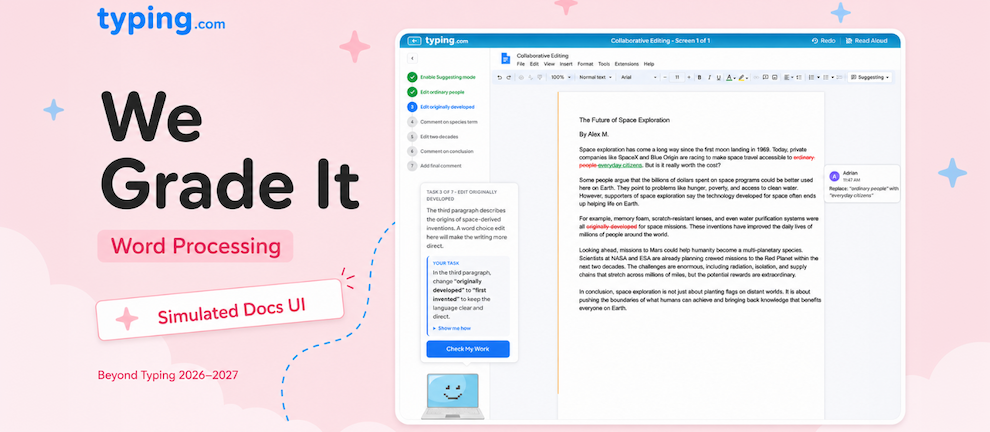
If you've used our Computer Applications unit, you know the drill. Students download a PDF of instructions, open their own copy of Word or Google Docs, complete the work offline, and submit a finished document. Then you open every single one, check whether each student actually followed every step, and grade them by hand.
We're done with that. The rebuilt Word Processing - Computer Applications 1 eliminates every piece of that workflow.
What's New?
Word processing is now taught inside a fully simulated Google Docs UI built right into Typing.com. The platform teaches the skill, watches each student perform it, and evaluates the work itself-automatically. No PDFs, no submissions, no manual scoring.

This is one of the biggest leaps in the entire 2026-2027 rebuild, and it changes what's possible in your classroom. Instead of spending hours grading documents, you spend that time teaching-or doing literally anything else.
The unit covers grades 2 through 12 plus Adult, so students can build word processing skills from their earliest paragraph all the way through professional-grade documents.
How Does It Work?
Every lesson is anchored by a friendly mentor avatar that matches the student's chosen theme or World. For students on the default theme or any of our existing themes, that's the laptop guy who's been the face of Typing.com for ages. For students in the new Pixel Kingdom World, it's the Wizard. For students in the new Princess Adventures World, it's the Cat Wizard. Same role, same teaching pattern, just a different character guiding the experience to match where the student already is.

Whoever the mentor is, they guide students through each new skill with "show me" demonstrations-visual walk-throughs of every cursor movement and every button click, so students see exactly what to do before they try it themselves. They can replay the demonstration as many times as they need.
Then students perform the action in the simulated Docs interface. The platform watches what they do and gives immediate feedback - did they hit the right button? Did they apply the formatting correctly? Did they actually complete the task or just type something that looks similar? Typing.com knows.
Every lesson culminates in an assessment that serves as the practical application of everything covered up to that point. Students prove they've mastered the skill, the platform confirms it, and you move on with confidence.
What Skills Get Covered?
The unit covers word processing from absolute beginner all the way through professional-grade document creation:
Foundational
-
Paragraph writing and formatting
-
Editing
-
Copy, cut, and paste
-
Lists
-
Page layout
-
Find and replace

Structural
-
Images
-
Tables
-
Tables of contents
-
Outlines
-
Page formatting
-
Revision and comments

Advanced
-
Multi-page reports
-
Comparison tables
-
Visual reports
-
Collaborative editing
-
Footnotes and citations
-
Formal letters
-
Professional emails
-
Style guide templates
-
Resumes

By the time students finish the unit, they can produce documents that hold up in college, in a job, or anywhere else they'll need to write something polished.
Why This Matters
Think about what you do today when you assign a word processing task:
-
Distribute the assignment
-
Wait for students to submit
-
Open every document
-
Check every formatting decision
-
Note what each student did wrong
-
Write up feedback
-
Score it
-
Return it
With the rebuilt Word Processing unit, all of that disappears. The platform teaches the skill, validates each step in real time, and produces the data automatically. You see exactly who's mastered what, where students got stuck, and who needs more support-without opening a single document.
That's not just a quality-of-life improvement. It's the difference between assigning word processing once a semester because grading it is so painful, and assigning it as often as your students need.
Standards Alignment
Lessons align to a strong set of state and national frameworks:
-
Texas TEKS
-
ISTE 6 (Creative Communicator) and ISTE 7 (Global Collaborator)
-
New York Digital Literacy Standards
-
Florida State Standards
-
Common Core ELA - Writing and Language
-
CSTA K-12 CS Standards
How Does This Help You?
This rebuild means you can:
-
Stop grading student documents. The platform teaches and evaluates every skill-no PDFs, no submissions, no manual scoring
-
Assign word processing way more often. Without the grading bottleneck, you can give students the practice they actually need
-
See real mastery data. You know exactly which skills each student has nailed and which ones need more work
-
Teach the full arc. From a 2nd grader's first paragraph to a senior's polished resume-and on into Adult learners-it's all here
-
Engage students with a themed mentor. Whether it's the default laptop guy, the Wizard in Pixel Kingdom, or the Cat Wizard in Princess Adventures, "show me" demonstrations and instant feedback turn an intimidating tool into something students can actually master
-
Meet the standards that matter. Texas TEKS, ISTE, New York Digital Literacy, Florida State, Common Core ELA, and CSTA alignment across the unit
A Heads-Up on Spreadsheets
A companion unit-Spreadsheets - Computer Applications 2- is in development and uses the exact same model: simulated UI, mentor-guided instruction, automatic evaluation. Students will learn cell selection, data entry, and formulas like SUM with the same hands-on guidance and immediate feedback. It's not in the preview menu yet, but keep an eye out for its launch.
Where Can I Find It?
You'll find Word Processing - Computer Applications 1 in your Curriculum section under Beyond Typing, in the group called "Beyond Typing 2026/27 PREVIEW." It's ready to browse, preview, and assign right now. Anything your students complete today carries over when these units become the standard Beyond Typing curriculum in July 2026.

Ready to Dive In?
Word Processing is one of seven units being rebuilt for 2026-2027-check out the full summary of what's coming for the bigger picture. Or just jump straight in and assign the first lesson. The first time you check the report instead of opening twenty-five student documents, you'll wonder how you ever did it the old way.