
 US English
 Español
 Português





Your Class Dashboard Just Got a Fresh New Look
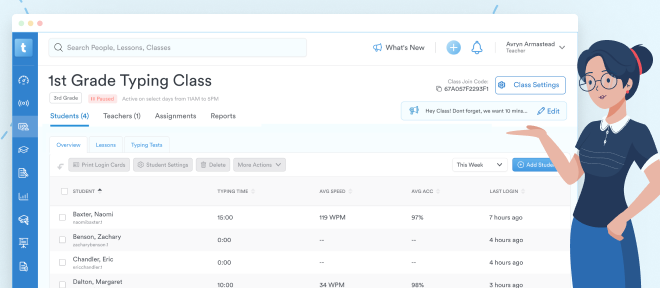
We heard you: you wanted a simpler way to see your class roster and the vital stats that matter most. So we've redesigned the class dashboard to put exactly that front and center.
Now when you click into a class, you'll land on a clean overview showing your students along with their key metrics: time spent typing, WPM, and accuracy. No extra clicks, no digging around.
But don't worry, you'll still be able to find everything you need. Here's where to find it all:
Your Students at a Glance
The Students tab is now the heart of your class dashboard. At a glance, you can see your full roster with the stats you check most often: last login, typing time, average speed, and average accuracy.
Class Announcements
Class announcements have moved from the main dashboard area to the right side of your class screen, just below Class Settings. Click Add to create a new announcement for your students.
Introducing the Scoreboard Tab ✨
The class dashboard now features a brand new Scoreboard tab! Here you can view weekly student performance ranked by WPM, accuracy, and time spent typing. You'll also find your Top 3 students and associated certificates here.
Lessons and Typing Tests Reports Have Moved
The Lessons and Typing Tests sub-tabs are still visible under the Students tab, but the reports themselves have moved to the Reports tab. When you click on Lessons or Typing Tests, you'll see a message letting you know the report has moved, along with a "Show Me" button that takes you directly to the Reports tab.
Within the Reports tab, you'll find everything organized into clear categories:
Test Reports
-
Test Improvement Summary: Track student improvement across all test types, from first attempt to most recent
-
Test Activity Details: View detailed typing test performance including speed, accuracy, and errors
Lesson Reports
-
Current Lesson Progress: See student lesson progress up to the current date
-
Typing Lesson Details: Dive deeper into student performance within specific lessons
-
Written Prompt Details: Review student written prompt responses in full
-
Quiz Details: Track quiz scores, time spent, and number of attempts
Activity Reports
-
Activity Summary: Get a high-level overview of student engagement for a specific timeframe
-
Class Scoreboard: View weekly student performance ranked by WPM, accuracy, and time spent typing
Game Reports
-
Game Summary: View student game progress up to the current date
-
Game Details: View student game activity in detail, including games played, level of difficulty, and time spent
A Note About the Transition: The Lessons and Typing Tests sub-tabs will eventually be removed once everyone has had time to get familiar with the new layout. For now, they'll remain in place with redirect messages to help guide you to the new locations.
We hope this refreshed class dashboard helps you spend less time navigating and more time supporting your students' typing journey. Happy teaching!